Enhanced Accuracy
If enabled, all points that meet the minimum limit criteria will be analyzed in more detail. The 1st 500 entries will be read and the statistics will be extrapolated accordingly.
Highlight Thinned Points
If enabled, points that meet the thinning model criteria will be displayed in blue.
Active Point Definition
Specifies the criteria of what defines an active point.
An active point is one that is being consistently updated and whose history can be extrapolated based upon a small sample. An accurate definition of active points will prevent old or temporary points from skewing the estimated size of the VHS at steady state potential. Currently there are three optional criteria which can be used to define active points. A point must meet all of the enabled criteria to be considered active.
Select Active Point Definition… on the utility’s Options menu to define active points.
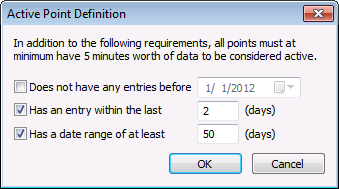
Active point requirements include the following options:
- Does not have any entries before — If enabled, all active points must not have any entries before the specified date.
- Has an entry within the last — If enabled, all active points must have at least one entry within the last number of days specified.
- Has a date range of at least — If enabled, all active points must have at least this many days of data in the VHS.


